
Use these notations to make CES / Token Book Entries or your transactions will be rejected.
COMMUNITY NOTATION SYSTEM
Offering Notation list *
Private Equity – Any Named Service or Product
ETF – Any Named / Term + Asset / Asset
Any Named / Type Bond
Any Named Stock / Share
Any Named / Type Bullion
Any Named / Type Fund
Any Named / Type Treasuries (World Treasury Window)
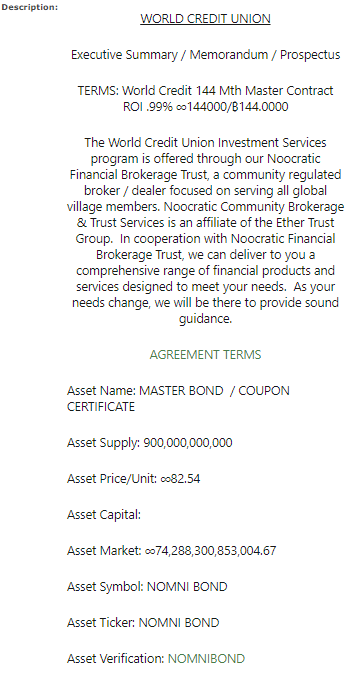
OFFERING EXAMPLE
Bid Order Notation list *
Private Equity – Service or Product + CES Offering Advert ID Number
ETF – Asset / Asset + CES Offering Advert ID Number
Any Named Bond + CES Offering Advert ID Number
Any Named Share / Stock + CES Offering Advert ID Number
Any Named Bullion + CES Offering Advert ID Number
Any Named Fund + CES Offering Advert ID Number
Any Named Treasuries + CES Offering Advert ID Number
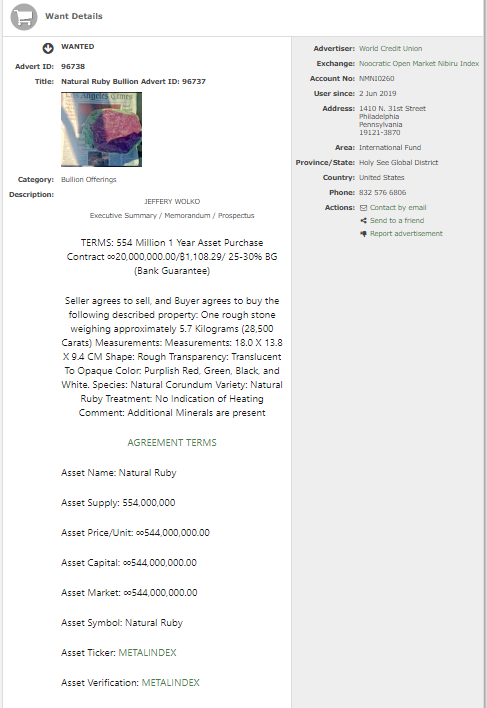
BID BUYER ORDER EXAMPLE
Transaction Notation list *
Please visit the CES and begin to make a deposit or purchase of Mutual Credit to your Balance by depositing a check, e-check, digital fiat, or ETF. Then post a photo copy of the physical item or instrument on deposit in the announcements. Enter the Transaction as the Seller of the Instrument. The Buyer is the World Credit Union or any Financial Institution in the World Open Market Exchange. The description should read: Deposit of Transaction Hash No. or receipt from the Blockchain or (e)Check, Bond, Note, or Bill, SKR or Coupon Number from the instrument.
FOR E-CHECKS
DESCRIPTION – NOTATION OPTIONS
Draft Deposits: Transaction Number / Hours / Hash (Blockchain Ledger)
Check Deposit: (Trade Slip) e-check or Check No (Bank Ledger)
Book Entry: Credit Voucher + CES Transaction ID (Transaction Report)
SELLER: WORLD CREDIT UNION – NMNI0260 | FINANCIAL INSTITUTION CES#
CREDIT DEPOSIT:
DESCRIPTION – NOTATION OPTIONS
Draft Deposits: Transaction Number / Hours / Hash (Blockchain Ledger)
Check Deposit: (Trade Slip) e-check or Check No (Bank Ledger)
Book Entry: Credit Voucher + CES Transaction ID (Transaction Report)
SELLER: GLOBAL CES ACCOUNT | AMOUNT: ∞
BUYER: WORLD CREDIT UNION – NMNI0260 | FINANCIAL INSTITUTION CES#
• To add a new announcement to this list click on the [Add Announcement] button. This will take you to a form where you can enter the details of the announcement. Please do not use the announcements list for advertising your personal offerings.
Make your Credit Deposit here.
OPTIONS: WORLD CREDIT | COUNTERPAY | PUBLIC BANK
SMART WITHDRAW
Please visit the World Credit Union CES here and begin to make a smart withdraw or exchange by depositing World Currency and a few federal currencies to your Balance. All Currency deposits are converted to XCP Book Entry Credits. All withdraws to your Secured Cards or Public Bank that cause a pre-conversion exchange will be treated as Pre-Conversion Loans.
DESCRIPTION: Withdraw Order + TRANSACTION HASH NO.
SELLER: WORLD CREDIT UNION – NMNI0260 | FINANCIAL INSTITUTION CES#
BUYER: GLOBAL CES ACCOUNT | AMOUNT: ∞
Place your Withdraw order here.
OPTIONS: NVC PAY (Coming Soon)
PURCHASE ORDER
DESCRIPTION: Purchase Order + CES OFFER ADVERT ID
SELLER: WORLD CREDIT UNION – NMNI0260 | FINANCIAL INSTITUTION CES#
BUYER: GLOBAL CES ACCOUNT | AMOUNT: ∞
Amount:
Send your Purchase Order here.
MONEY ORDER
DESCRIPTION: Money Order + CES OFFER ADVERT ID
SELLER: WORLD CREDIT UNION – NMNI0260 | FINANCIAL INSTITUTION CES#
BUYER: GLOBAL CES ACCOUNT | AMOUNT: ∞
Amount:
Send your Money Order here.
EXCHANGE ORDER
Please visit CES and begin to make an Exchange Order or exchange by depositing World Currency and a few federal currencies to your W.O.M.E Balance.
DESCRIPTION: Trade Order + XCHAIN ASSET / ASSET VERIFICATION | CES ADVERT
SELLER: WORLD CREDIT UNION – NMNI0260 | FINANCIAL INSTITUTION CES#
BUYER: GLOBAL CES ACCOUNT | AMOUNT: ∞
Amount:
Place your Trade Order here.
Send your Money Order here.
TRANSFER ORDER
Please visit CES and begin to make a Transfer Order or exchange by depositing World Currency and a few federal currencies to your W.O.M.E Balance.
DESCRIPTION: Transfer Order + XCHAIN ASSET / E-WALLET ROUTING ADDRESS
SELLER: GLOBAL CES ACCOUNT | AMOUNT: ∞
BUYER: WORLD CREDIT UNION – NMNI0260 | FINANCIAL INSTITUTION CES#
Amount:
SEND | RECEIVE E-WALLET TRANSACTIONS
Please log in to your Counterpay app on your E-Wallet go tools and click Send or Receive. For NVC find to send in the dashboard menu. Send to anyone with a Bitcoin-based E-Wallet Routing Address. Please add GLOBAL CES in the Transaction Memo.
Please send your E-wallet Transactions here
Transaction Memo: Item / Invoice No. (Presentment Statement of Account #)
OPTIONS: COUNTERPAY | NVC PAY
*Please use the QR Below to make Free Will Donations
VOUCHER DEPOSIT | CREDIT DEPOSIT | SMART DEPOSIT
VOUCHER WITHDRAW | SMART WITHDRAW | CREDIT WITHDRAW
18SzD3cfwCcV9p6C38ho4uZPHE8ygVB9iq
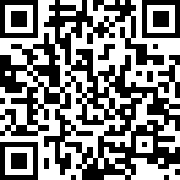
WORLD CREDIT UNION E-WALLET QR
Need to Buy Bitcoin? | 9% Standard Benchmark Exchange Rate | What is Bitcoin?
Global Developer? Please contact us
 World Credit Union®